
Mafiree logo
  • About
  • Services
  • Blogs
  • Careers
  • Products
    • orbit logo Orbit
    • streamer logo Xstreami
  • Contact
Schedule a Call
Menu
  • About
  • Services
  • Blogs
  • Careers
  • Products
    • orbit logo Orbit
    • streamer logo Xstreami
  • Contact
  • Schedule a Call
Database
Database Database Managed Services
MySQL MySQL
MySQL Consulting Services
MySQL Migration Services
MySQL Optimization & Query Tuning
MySQL Database Administration
MySQL Backup & Recovery
MySQL Security & Maintenance
MySQL Cloud Services (AWS RDS, Aurora, Google Cloud SQL, Azure)
MySQL for Ecommerce
MySQL High Availability & Replication
MongoDB MongoDB
MongoDB Consulting Services
MongoDB Migration Services
MongoDB Optimization & Query Tuning
MongoDB Database Administration
MongoDB Backup & Recovery
MongoDB Security & Maintenance
MongoDB Cloud (Atlas)
MongoDB Solutions by Industry
MongoDB High Availability & Replication
PostgreSQL PostgreSQL
PostgreSQL Consulting
PostgreSQL Migration & Upgrades
Performance Tuning & Query Optimization
PostgreSQL Administration & Managed Services
High Availability, Clustering & Replication
PostgreSQL Backup, Recovery & Disaster Planning
PostgreSQL Security, Compliance & Auditing
PostgreSQL for Analytics & Data Warehousing
PostgreSQL on Cloud & Containers
PostgreSQL Extensions & Open-Source Integrations
PostgreSQL for Every Industry
SQL Server MSSQL
MSSQL Consulting Services
MSSQL Migration Services
MSSQL Optimization & Query Tuning Services
MSSQL Database Administration Services
MSSQL Backup & Recovery Services
MSSQL High Availability & Replication Services
MSSQL Security & Compliance Services
MSSQL Performance Monitoring & Health Checks
MSSQL Solutions by Industry
Aerospike Aerospike
Aerospike Consulting Services
Aerospike Migration Services
Aerospike Performance Optimization & Tuning
Aerospike Database Administration
Aerospike Backup & Recovery
Aerospike High Availability
Aerospike Cloud & Hybrid Deployments
Aerospike for Real-Time Applications (AdTech, FinTech, Retail, IoT)
Analytics DB
Analytics DB Analytics DB Services
Clickhouse Clickhouse
ClickHouse Consulting Services
ClickHouse Migration Services
ClickHouse Optimization & Query Tuning
ClickHouse Database Administration
ClickHouse Backup & Recovery
ClickHouse Security & Maintenance
ClickHouse Cloud Services (ClickHouse Cloud, AWS, GCP, Azure)
ClickHouse Solutions by Industry
ClickHouse High Availability & Replication
TiDB TiDB
TiDB Consulting & Architecture Planning
TiDB Administration & Maintenance
TiDB Security and Privacy Maintenance
TiDB Performance & Query Optimization
TiDB Migration Services
TiDB Backup & Disaster Recovery
TiDB High Availability Solutions
TiDB Solutions by Industry
TiDB Cloud Services
ScyllaDB ScyllaDB
ScyllaDB Consulting & Architecture Planning
ScyllaDB Administration & Maintenance
ScyllaDB Security and Privacy Maintenance
ScyllaDB Performance & Query Optimization
ScyllaDB Migration Services
ScyllaDB Backup & Disaster Recovery
ScyllaDB High Availability Solutions
ScyllaDB Solutions by Industry
ScyllaDB Cloud Services
DevOps
DevOps DevOps Services
Version Control Version Control
Kubernetes Kubernetes
Infrastructure Infrastructure Management
Web Servers Web Servers
Networking
Networking Networking Services
Basic Basic
Advanced Advanced
MySQL MySQL
MongoDB MongoDB
PostgreSQL PostgreSQL
MSSQL MSSQL
Aerospike Aerospike
Clickhouse Clickhouse
TiDB TiDB
ScyllaDB ScyllaDB
Version Control Version Control
Kubernetes Kubernetes
Infrastructure Infrastructure Management
Web Servers Web Servers
Basic Basic
Advanced Advanced
MySQL Consulting Services
MySQL Migration Services
MySQL Optimization & Query Tuning
MySQL Database Administration
MySQL Backup & Recovery
MySQL Security & Maintenance
MySQL Cloud Services (AWS RDS, Aurora, Google Cloud SQL, Azure)
MySQL for Ecommerce
MySQL High Availability & Replication
MongoDB Consulting Services
MongoDB Migration Services
MongoDB Optimization & Query Tuning
MongoDB Database Administration
MongoDB Backup & Recovery
MongoDB Security & Maintenance
MongoDB Cloud (Atlas)
MongoDB Solutions by Industry
MongoDB High Availability & Replication
PostgreSQL Consulting
PostgreSQL Migration & Upgrades
Performance Tuning & Query Optimization
PostgreSQL Administration & Managed Services
High Availability, Clustering & Replication
PostgreSQL Backup, Recovery & Disaster Planning
PostgreSQL Security, Compliance & Auditing
PostgreSQL for Analytics & Data Warehousing
PostgreSQL on Cloud & Containers
PostgreSQL Extensions & Open-Source Integrations
PostgreSQL for Every Industry
MSSQL Consulting Services
MSSQL Migration Services
MSSQL Optimization & Query Tuning Services
MSSQL Database Administration Services
MSSQL Backup & Recovery Services
MSSQL High Availability & Replication Services
MSSQL Security & Compliance Services
MSSQL Performance Monitoring & Health Checks
MSSQL Solutions by Industry
Aerospike Consulting Services
Aerospike Migration Services
Aerospike Performance Optimization & Tuning
Aerospike Database Administration
Aerospike Backup & Recovery
Aerospike High Availability
Aerospike Cloud & Hybrid Deployments
Aerospike for Real-Time Applications (AdTech, FinTech, Retail, IoT)
ClickHouse Consulting Services
ClickHouse Migration Services
ClickHouse Optimization & Query Tuning
ClickHouse Database Administration
ClickHouse Backup & Recovery
ClickHouse Security & Maintenance
ClickHouse Cloud Services (ClickHouse Cloud, AWS, GCP, Azure)
ClickHouse Solutions by Industry
ClickHouse High Availability & Replication
TiDB Consulting & Architecture Planning
TiDB Administration & Maintenance
TiDB Security and Privacy Maintenance
TiDB Performance & Query Optimization
TiDB Migration Services
TiDB Backup & Disaster Recovery
TiDB High Availability Solutions
TiDB Solutions by Industry
TiDB Cloud Services
ScyllaDB Consulting & Architecture Planning
ScyllaDB Administration & Maintenance
ScyllaDB Security and Privacy Maintenance
ScyllaDB Performance & Query Optimization
ScyllaDB Migration Services
ScyllaDB Backup & Disaster Recovery
ScyllaDB High Availability Solutions
ScyllaDB Solutions by Industry
ScyllaDB Cloud Services
  1. Home
  2. > Blogs
  3. > PostgreSQL
  4. > Incremental Backup In PostgreSQL 17

Incremental Backup In PostgreSQL 17

Revolutionize your database management with PostgreSQL 17! Experience faster, smarter, and more efficient backups with the power of incremental backup. Reduce storage, save time, and ensure seamless recovery – the future of PostgreSQL backup starts here!

Jethish March 27, 2026

Subscribe for email updates

PostgreSQL 17 has brought numerous enhancements to the table, but one feature that stands out for database administrators is native PostgreSQL incremental backup support. This addition simplifies the backup process, reduces storage requirements, and optimizes resource usage — making it a must-adopt for enterprises managing large and dynamic databases. 


As a PostgreSQL-focused managed services provider, Mafiree has helped organizations of all sizes tackle backup challenges, and we're here to break down exactly how this feature works and how you can make the most of it.


What Is Incremental Backup?

A PostgreSQL incremental backup captures only the changes made since the last backup, whether it was a full or another incremental backup. This approach significantly reduces backup times and storage consumption compared to full backups, which duplicate all data regardless of changes.

Before PostgreSQL 17, achieving incremental backups required external tools like pgBackRest or Barman, which provided robust solutions but demanded additional configuration and maintenance. Now, with native support, PostgreSQL has simplified this process, integrating incremental backup seamlessly into its ecosystem.


Key Features of Incremental Backup in PostgreSQL 17

1. Native Integration

Incremental backup is built into PostgreSQL's core functionality, reducing the dependency on third-party tools.

2. Efficiency in Data Storage

Only modified pages are backed up, minimizing storage requirements.

3. Faster Backup and Recovery Times

Incremental backups are quicker to create and streamline recovery by applying only the necessary changes on top of the last full backup.


How Incremental Backup Works in PostgreSQL 17

PostgreSQL 17 leverages the pg_basebackup utility, enhanced with incremental capabilities.


1. Enable WAL Summarization

Enable the summarize_wal parameter in the postgresql.conf file.


Summarize_wal = on 


Note : Enables the WAL summarizer process. Note that WAL summarization can be enabled either on a primary or on a standby. This parameter can only be set in the postgresql.conf file or on the server command line. The default is off.

2. Create a Full Backup

First create a full backup using pg_basebackup.

[mafiree@rhel8 ~]$ pg_basebackup -D /var/lib/pgsql/17/full_data_backup/ -c fast -p 5432 -v
Password: 
pg_basebackup: initiating base backup, waiting for checkpoint to complete
pg_basebackup: checkpoint completed
pg_basebackup: write-ahead log start point: 9/7A000028 on timeline 1
pg_basebackup: starting background WAL receiver
pg_basebackup: created temporary replication slot "pg_basebackup_3857937"
pg_basebackup: write-ahead log end point: 9/7A000120
pg_basebackup: waiting for background process to finish streaming ...
pg_basebackup: syncing data to disk ...
pg_basebackup: renaming backup_manifest.tmp to backup_manifest
pg_basebackup: base backup completed

3. Insert Data and Take the first Incremental Backup

Next insert some data and now take an incremental backup.

mafiree=# INSERT INTO customer (first_name, last_name, email, phone) VALUES
mafiree-# ('Robert', 'Williams', 'robert.williams@example.com', '777-888-9999'),
mafiree-# ('Jessica', 'Davis', 'jessica.davis@example.com', '222-333-4444');
INSERT 0 2

Taking an incremental backup using the backup_manifest from the full backup which we took above.

[mafiree@rhel8 17]$ pg_basebackup --incremental=/var/lib/pgsql/17/full_data_backup/backup_manifest -D /var/lib/pgsql/17/increment_backup1/ -p 5432 -c fast -v
Password: 
pg_basebackup: initiating base backup, waiting for checkpoint to complete
pg_basebackup: checkpoint completed
pg_basebackup: write-ahead log start point: 9/7E000028 on timeline 1
pg_basebackup: starting background WAL receiver
pg_basebackup: created temporary replication slot "pg_basebackup_3862608"
pg_basebackup: write-ahead log end point: 9/7E000120
pg_basebackup: waiting for background process to finish streaming ...
pg_basebackup: syncing data to disk ...
pg_basebackup: renaming backup_manifest.tmp to backup_manifest
pg_basebackup: base backup completed

4. Insert some more records and Take the Second Incremental Backup

Again insert some data and now take an incremental backup using the backup_manifest from the first incremental backup

mafiree=# INSERT INTO customer (first_name, last_name, email, phone) VALUES
mafiree-# ('William', 'Clark', 'william.clark@example.com', '999-111-2222'),
mafiree-# ('Olivia', 'Martinez', 'olivia.martinez@example.com', '888-999-0000'),
mafiree-# ('Sophia', 'Garcia', 'sophia.garcia@example.com', '333-444-5555');
INSERT 0 3

Taking an incremental backup,

[mafiree@rhel8 17]$ pg_basebackup --incremental=/var/lib/pgsql/17/increment_backup1/backup_manifest -D /var/lib/pgsql/17/increment_backup2/ -p 5432 -c fast -v
Password: 
pg_basebackup: initiating base backup, waiting for checkpoint to complete
pg_basebackup: checkpoint completed
pg_basebackup: write-ahead log start point: 9/80000028 on timeline 1
pg_basebackup: starting background WAL receiver
pg_basebackup: created temporary replication slot "pg_basebackup_3864096"
pg_basebackup: write-ahead log end point: 9/80000120
pg_basebackup: waiting for background process to finish streaming ...
pg_basebackup: syncing data to disk ...
pg_basebackup: renaming backup_manifest.tmp to backup_manifest
pg_basebackup: base backup completed

Restoring the backups 

Restore by combining all backups using the pg_combinebackup utility:

[mafiree@rhel8 17]$ pg_combinebackup -o /var/lib/pgsql/17/combined_backup /var/lib/pgsql/17/full_data_backup /var/lib/pgsql/17/increment_backup1 /var/lib/pgsql/17/increment_backup2

Change the port in the restored directory  /var/lib/pgsql/17/combined_backup/postgresql.conf file and start the database server with that data directory.

[mafiree@rhel8 combined_backup]$ /usr/pgsql-17/bin/pg_ctl -D /var/lib/pgsql/17/combined_backup/ start 
waiting for server to start....2024-12-07 11:42:06 IST::@:[3867989]: LOG:  redirecting log output to logging collector process
2024-12-07 11:42:06 IST::@:[3867989]: HINT:  Future log output will appear in directory "log".
done
server started

Login and verify the restored data:

[mafiree@rhel8 combined_backup]$ psql -p 1717 -d mafiree
Password for user postgres: 
psql (17.0)
Type "help" for help.

mafiree=# select * from customer;
customer_id | first_name | last_name |            email            |    phone     |         created_at         
-------------+------------+-----------+-----------------------------+--------------+----------------------------
          1 | John       | Doe       | john.doe@example.com        | 123-456-7890 | 2024-12-07 11:11:16.3873
          2 | Jane       | Smith     | jane.smith@example.com      | 987-654-3210 | 2024-12-07 11:11:16.3873
          3 | Emily      | Jones     | emily.jones@example.com     | 555-666-7777 | 2024-12-07 11:11:16.3873
          4 | Michael    | Brown     | michael.brown@example.com   | 111-222-3333 | 2024-12-07 11:11:16.3873
          5 | Sarah      | Taylor    | sarah.taylor@example.com    | 444-555-6666 | 2024-12-07 11:11:16.3873
          6 | Robert     | Williams  | robert.williams@example.com | 777-888-9999 | 2024-12-07 11:27:20.2501
          7 | Jessica    | Davis     | jessica.davis@example.com   | 222-333-4444 | 2024-12-07 11:27:20.2501
          8 | William    | Clark     | william.clark@example.com   | 999-111-2222 | 2024-12-07 11:31:18.837552
          9 | Olivia     | Martinez  | olivia.martinez@example.com | 888-999-0000 | 2024-12-07 11:31:18.837552
          10 | Sophia     | Garcia    | sophia.garcia@example.com   | 333-444-5555 | 2024-12-07 11:31:18.837552
(10 rows)

What is pg_combinebackup?

The pg_combinebackup utility, introduced in PostgreSQL 17, is used to combine all incremental backups into a single full backup. This tool helps reconstruct a complete backup by merging incremental backups efficiently.


Advantages of Incremental Backup

  • Cost Savings: Reducing storage usage directly translates to lower costs for cloud or on-premises storage.
  • Improved Performance: Less data transfer reduces the load on the system, especially beneficial during peak hours.
  • Scalability: Ideal for environments with large databases or high-frequency changes.

Conclusion

The introduction of incremental backups in PostgreSQL 17 is a transformative enhancement for database management. This feature not only addresses the long-standing challenge of storage inefficiency and time-intensive backup processes but also paves the way for robust disaster recovery strategies.

Our team specializes in guiding organizations to fully leverage PostgreSQL 17’s capabilities for scalable and efficient data management. Whether it’s implementing incremental backups, designing robust backup policies, or ensuring high availability, Mafiree provides end-to-end solutions tailored to your needs.


For PostgreSQL support and advanced backup consulting, contact Mafiree at sales@mafiree.com . Let us help you redefine your database backup strategy with confidence.

Struggling with postgresql backup complexity. We are here to help you.

FAQ

In PostgreSQL, incremental backup and Point-In-Time Recovery (PITR) serve different purposes. Incremental backup is a backup strategy where only the data blocks that have changed since the last backup are copied, which helps reduce backup size and duration. On the other hand, PITR is a recovery mechanism that uses Write-Ahead Logs (WAL) along with a base backup to restore the database to a specific point in time. In simple terms, incremental backup is about efficiently taking backups, whereas PITR is about achieving precise recovery.
The summarize_wal feature in PostgreSQL 17 is designed to support incremental backups by tracking changes at the data block level. When enabled, it records which blocks have been modified in the WAL and generates WAL summary files. These summaries allow PostgreSQL to identify only the changed blocks during an incremental backup, avoiding the need to scan the entire data directory. This significantly improves backup efficiency and is a key requirement for native incremental backup functionality.
No, incremental backups cannot be taken from a standby server in PostgreSQL 17. This is because incremental backups depend on WAL summary information generated by the summarize_wal feature, which is only maintained on the primary server. While standby servers can be used for full or base backups, incremental backups must be performed on the primary instance where WAL summarization is active.
The native incremental backup feature in PostgreSQL 17 comes with several limitations. It requires summarize_wal to be enabled, and it works only with pg_basebackup, limiting flexibility with other tools. Incremental backups can only be taken from the primary server and not from standby instances. Additionally, restoration depends on a complete chain of backups, including the base backup and all subsequent incremental backups, making it sensitive to missing pieces. It also operates at the cluster level rather than supporting per-table backups, and it requires proper retention of WAL and summary files to function correctly.

Author Bio

Jethish

Jethish is a PostgreSQL DBA at Mafiree with expertise in building scalable, reliable, and high-performance database infrastructures. He focuses on PostgreSQL architecture, replication strategies, performance tuning, and high availability for mission-critical systems. Through his technical writing, he shares clear, practical insights on database internals, replication choices, load balancing, and cross-database integrations that help engineers and DBAs tackle real-world data challenges.

Leave a Comment

Related Blogs

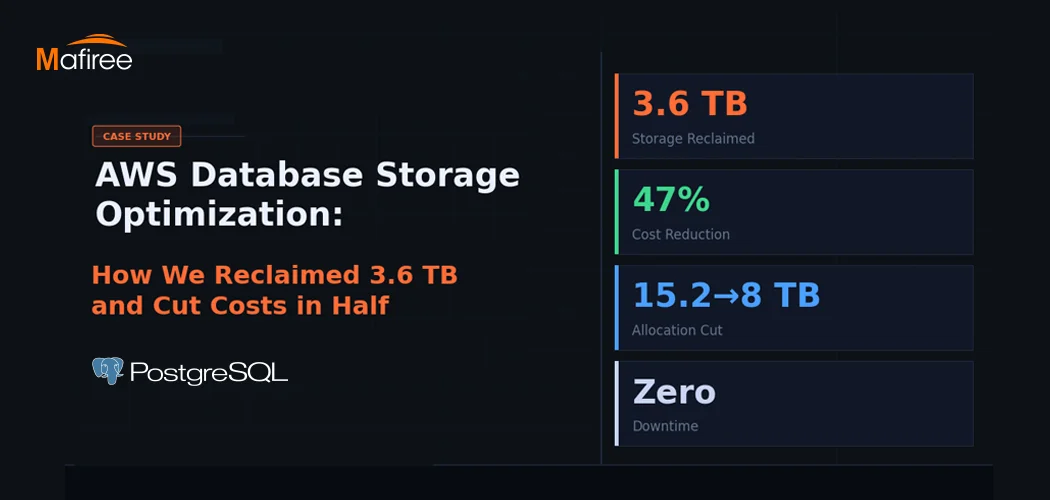
AWS Database Storage Optimization: How We Reclaimed 3.6 TB and Cut Costs in Half

A client came to us with a classic AWS database storage optimization problem: 15.2 TB allocated, less than a third actually in use — and a bill that kept growing regardless. Within one week, Mafiree had reclaimed 3.6 TB, validated a safe path to cut allocation nearly in half, and executed a zero-downtime migration. Here's the full story.

  125 views
PostgreSQL Connection Pooling: PgBouncer vs Odyssey – Performance & Configuration

PostgreSQL uses a process-per-connection model, which can limit scalability in high-traffic environments. Connection poolers help manage this challenge by reusing database connections efficiently. This blog compares PgBouncer and Odyssey, two popular PostgreSQL connection poolers, highlighting their architecture, performance characteristics, configuration differences, and ideal use cases. It helps organizations choose the right pooling solution based on workload scale, complexity, and operational requirements.

  2088 views
8 Enhancing Features in PostgreSQL 18

PostgreSQL 18: Efficiency, security, and reliability, all in one upgrade

  4150 views
Optimizing PostgreSQL Queries with Functional Indexes – A Real-World Case Study

Cutting Query Time from 10 Minutes to Under 1 Second – How Functional Indexes Helped Us Optimize Aurora PostgreSQL and Stabilize CPU Performance.

  2848 views
Mastering PostgreSQL Meta-Commands: The Ultimate psql Cheat Sheet

Why memorize SQL queries when \d, \l, and \dx do the heavy lifting? Learn the power of PostgreSQL’s psql meta-commands today.

  9971 views

Subscribe for email updates

Get in touch with us

Highlights

More than 6000 Servers Monitored

Happy Clients

Certified DBAs

24 x 7 x 365 Support

PCI

Database Services

MySQL MongoDB PostgreSQL SQL Server Aerospike Clickhouse TiDB MariaDB Columnstore

Quick Links

Careers Blog Contact Privacy Policy Disclaimer Policy

Contacts

Linkedin Mafiree Facebook Mafiree Twitter Mafiree

Nagercoil Office

Miru IT Park, Vallankumaranvillai,

Nagercoil, Tamilnadu - 629 002.

Bangalore Office

Unit 303, Vanguard Rise,

5th Main, Konena Agrahara,

Old Airport Road, Bangalore - 560 017.

Call: +91 6383016411

Email: sales@mafiree.com


Copyright © - All Rights Reserved - Mafiree