 Orbit
Orbit
 Xstreami

- About
- Services
- Blogs
- Careers
- Products
- Contact Schedule a Call
A client came to us with a classic AWS database storage optimization problem: 15.2 TB allocated, less than a third actually in use — and a bill that kept growing regardless. Within one week, Mafiree had reclaimed 3.6 TB, validated a safe path to cut allocation nearly in half, and executed a zero-downtime migration. Here's the full story.
sukan March 18, 2026

Storage bloat is one of the most common — and most quietly expensive — problems in production database environments.
Our client was running a large archival database on AWS with 15.2 TB of allocated disk space. On the surface, everything was running fine. No crashes, no alerts. But when we looked closer, the numbers told a different story.
The hard truth about storage costs on AWS: You pay for allocated storage, not just used storage. On RDS or similar managed services, that gap between what's allocated and what's actually used is pure waste — and it compounds over time.
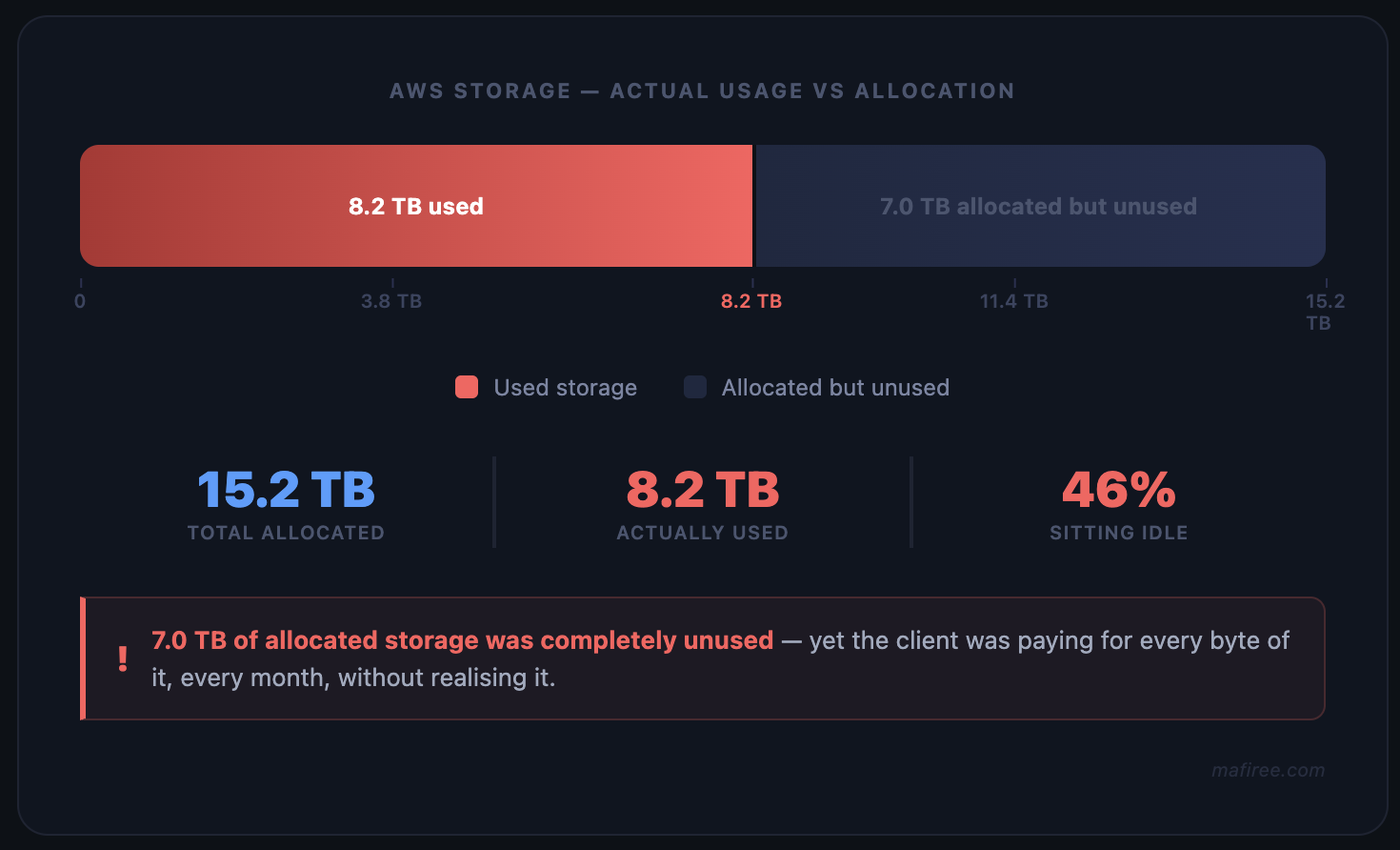
Fig 1 — Storage allocation vs actual usage before optimization
The database had accumulated years of unused tables — data structures that were no longer referenced by any application but still occupying disk space.
On top of that, PostgreSQL's MVCC (Multi-Version Concurrency Control) mechanism had left behind substantial dead row data that had never been properly vacuumed. These dead tuples don't disappear on their own. They sit there, taking up space, until someone runs the cleanup.
The result: a system that looked healthy but was silently inflating the AWS bill every single month.
When Mafiree's team began the AWS database storage optimization engagement, we started with a full audit.
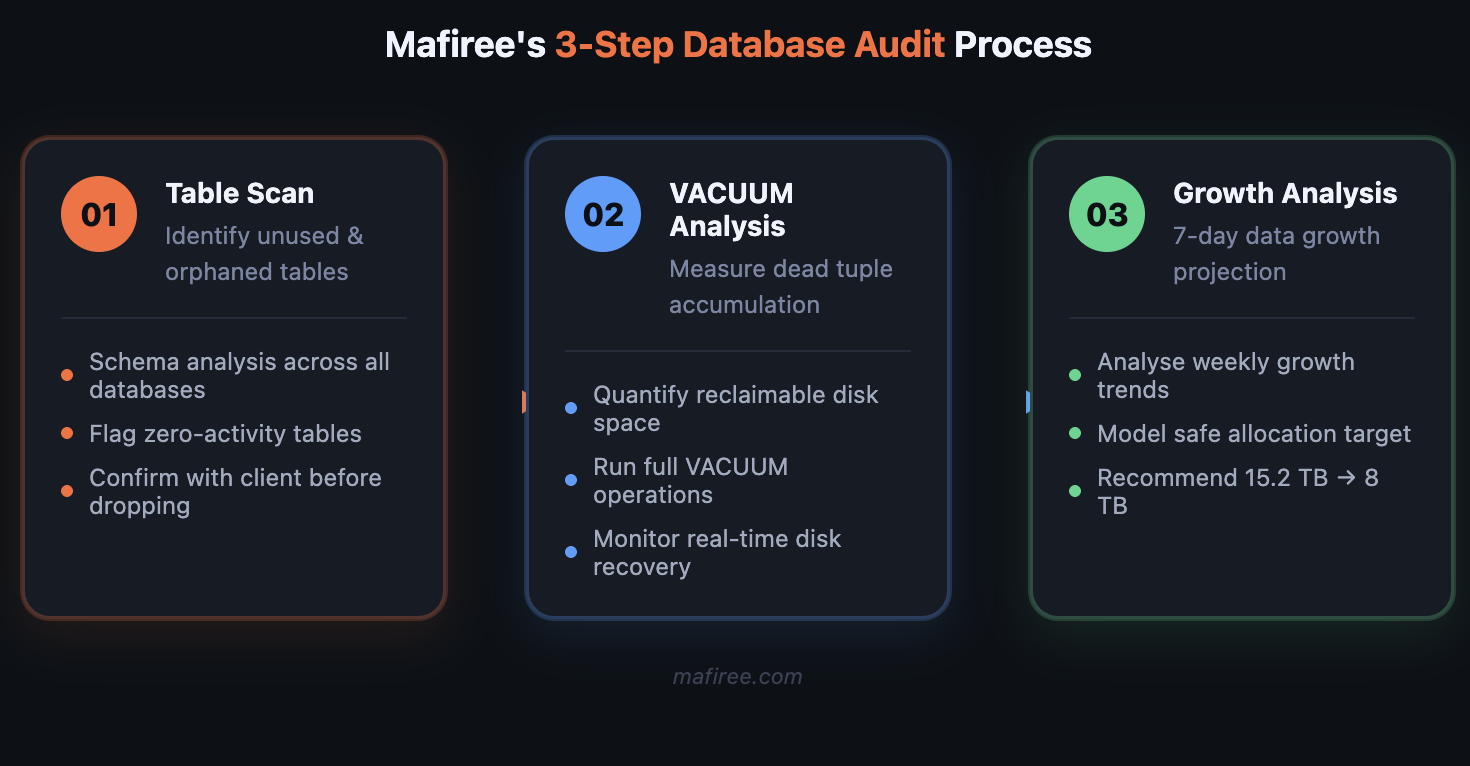
Fig 2 — Mafiree's 3-step database audit process
Our analysis surfaced three distinct issues:
1. Orphaned and unused tables — Multiple tables existed with zero recent read or write activity. Created for features or migrations that were long deprecated but never cleaned up. Combined, they represented a significant chunk of wasted space.
2. Dead tuple accumulation (VACUUM debt) — PostgreSQL's autovacuum had not been aggressive enough to keep pace with the workload history. Millions of dead rows were consuming space that could be returned to the OS — but only after explicit VACUUM operations were run.
3. Over-provisioned allocation with no growth justification — After pulling one week of data growth metrics, it was clear the database was growing at a rate that would never justify 15.2 TB. The actual trajectory pointed to 8 TB being more than sufficient with comfortable headroom.
We executed a structured cleanup in a controlled sequence:
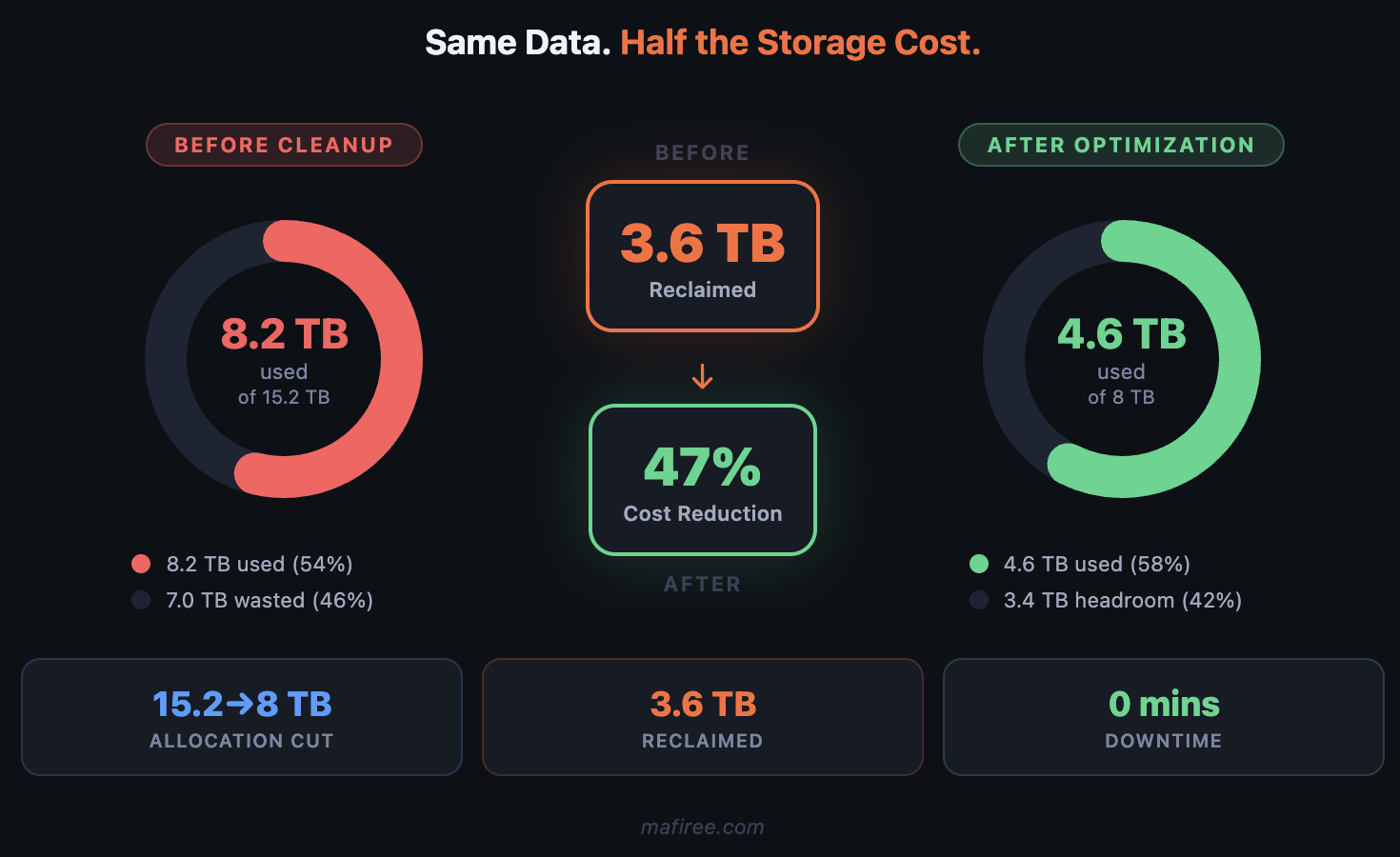
Fig 3 — Storage utilization before vs after cleanup (donut charts)
Reducing allocated storage on a live AWS instance isn't a simple resize — you can't shrink an EBS volume in place. The right way to do this safely is a blue-green deployment.
Here's the approach we recommended and executed:
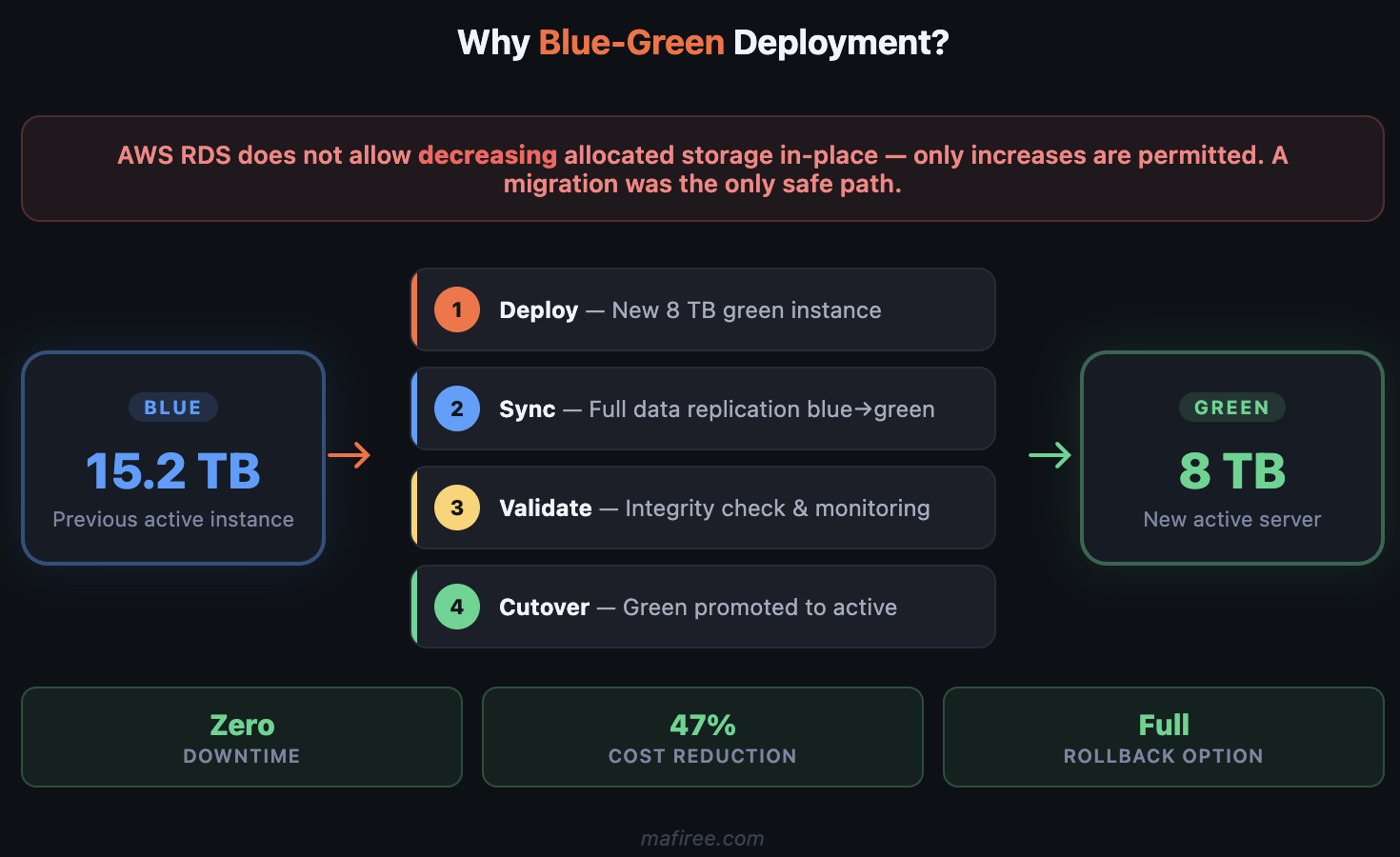
Fig 4 — Blue-green deployment architecture for zero-downtime storage reduction
| Step | Action | Detail |
|---|---|---|
| 1 | Deploy green instance | New AWS instance with 8 TB disk allocation |
| 2 | Sync data | Full data synchronization from blue → green |
| 3 | Validate | Mafiree team verified data integrity and performance |
| 4 | Schedule switchover | Coordinated with client for agreed maintenance window |
| 5 | Cutover | Green instance promoted to active archival server |
This approach meant zero data loss risk and gave the client a clear rollback path: the original blue instance remained intact until the green instance was fully validated.
The switchover was scheduled in coordination with the client's team and executed during the agreed maintenance window. Before declaring the cutover complete, Mafiree monitored the green instance for a full 24-hour stabilisation window — tracking query response times, replication lag, storage I/O, and error rates across all active workloads. Only after all metrics held steady did we officially close out the blue instance. The original blue instance was retained for an additional 72 hours as a rollback safety net before being decommissioned. Post-cutover monitoring confirmed:
With all three phases complete — cleanup, migration, and cutover — the environment was back to exactly where it should have been: lean, right-sized, and costing the client nearly half of what it did before.
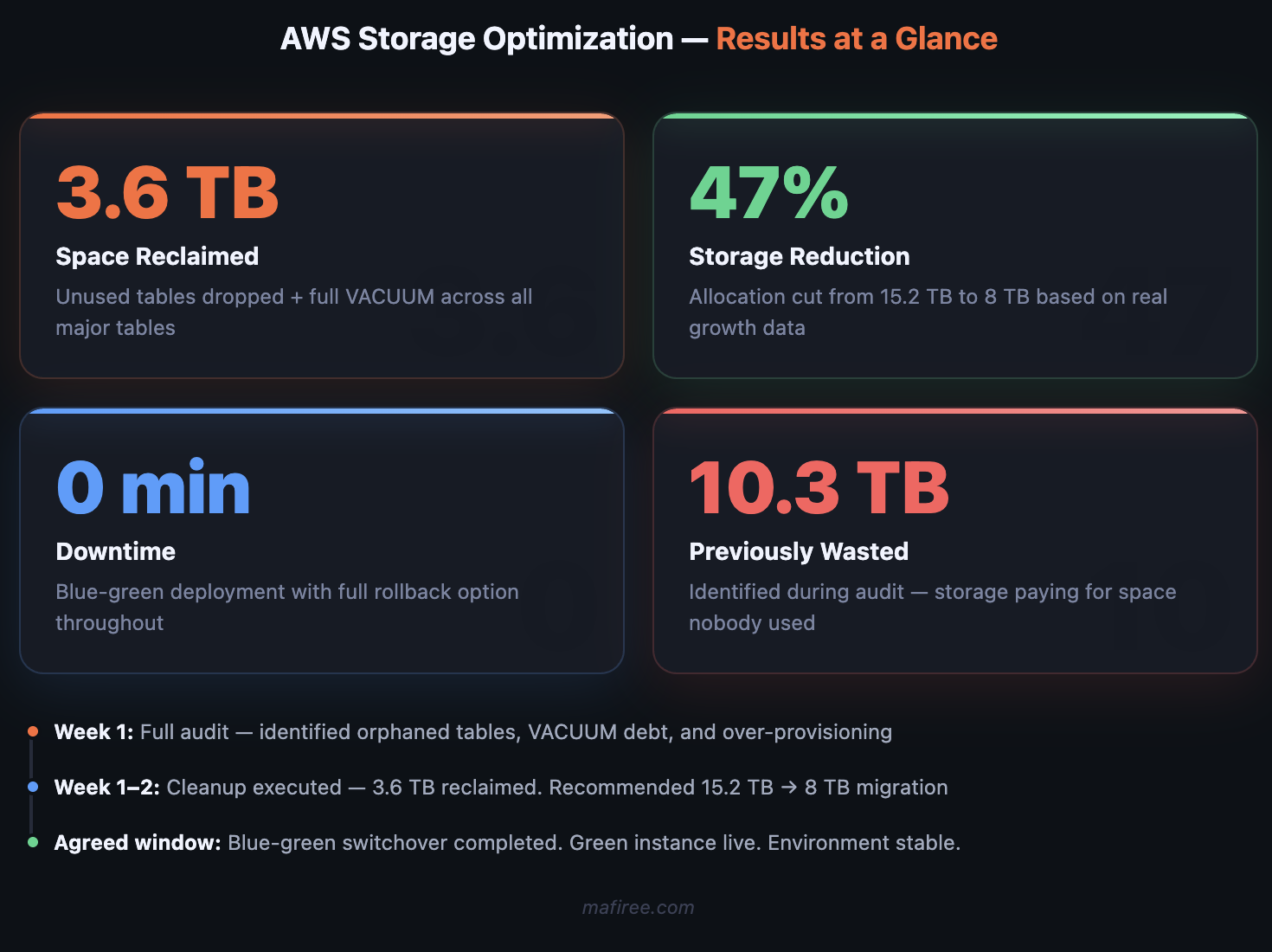
Fig 5 — Key results at a glance
| Metric | Before | After |
| Allocated storage | 15.2 TB | 8 TB |
| Used storage | ~8.2 TB | 4.6 TB |
| Free (wasted) space | ~7 TB | ~3.4 TB |
| Space reclaimed | — | 3.6 TB |
| Storage reduction | — | 47% |
On AWS, a 47% reduction in allocated storage translates almost directly to a 47% reduction in that line item of your cloud bill. For a large production database, that's a meaningful number.
It's tempting to look for a simpler path — can't you just resize the volume? In most AWS managed database setups, you cannot decrease allocated storage. AWS RDS, for example, only allows storage increases, not decreases.
The blue-green approach sidesteps this entirely by treating storage reduction as a migration rather than a modification. The new instance is provisioned correctly from day one, with no legacy configuration or fragmentation from the old environment.
The added benefit: the migration process itself acts as a health check. Any data integrity issues will surface during sync — before the cutover, when there's still time to address them safely.
At Mafiree (mafiree.com), we work with engineering teams to audit, optimize, and right-size cloud database infrastructure. Whether you're dealing with runaway storage costs, performance degradation from bloat, or a migration you need to execute safely — we've done it before.

More than 6000 Servers Monitored
Happy Clients
Certified DBAs
24 x 7 x 365 Support



Miru IT Park, Vallankumaranvillai,
Nagercoil, Tamilnadu - 629 002.
Unit 303, Vanguard Rise,
5th Main, Konena Agrahara,
Old Airport Road, Bangalore - 560 017.
Call: +91 6383016411
Email: sales@mafiree.com