
Mafiree logo
  • About
  • Services
  • Blogs
  • Careers
  • Products
    • orbit logo Orbit
    • streamer logo Xstreami
  • Contact
Schedule a Call
Menu
  • About
  • Services
  • Blogs
  • Careers
  • Products
    • orbit logo Orbit
    • streamer logo Xstreami
  • Contact
  • Schedule a Call
Database
Database Managed Database Services
MySQL MySQL
MySQL Consulting
MySQL Migration Services
MySQL Optimization & Query Tuning
MySQL Database Administration
MySQL Backup & Recovery
MySQL Security & Maintenance
MySQL Cloud Services (AWS RDS, Aurora, Google Cloud SQL, Azure)
MySQL for Ecommerce
MySQL High Availability & Replication
MongoDB MongoDB
MongoDB Consulting
MongoDB Migration Services
MongoDB Optimization & Query Tuning
MongoDB Database Administration
MongoDB Backup & Recovery
MongoDB Security & Maintenance
MongoDB Cloud (Atlas)
MongoDB Solutions by Industry
MongoDB High Availability & Replication
PostgreSQL PostgreSQL
PostgreSQL Consulting
PostgreSQL Migration & Upgrades
Performance Tuning & Query Optimization
PostgreSQL Administration & Managed Services
High Availability, Clustering & Replication
PostgreSQL Backup, Recovery & Disaster Planning
PostgreSQL Security, Compliance & Auditing
PostgreSQL for Analytics & Data Warehousing
PostgreSQL on Cloud & Containers
PostgreSQL Extensions & Open-Source Integrations
PostgreSQL for Every Industry
SQL Server MSSQL
MSSQL Consulting
MSSQL Migration Services
MSSQL Optimization & Query Tuning Services
MSSQL Database Administration Services
MSSQL Backup & Recovery Services
MSSQL High Availability & Replication Services
MSSQL Security & Compliance Services
MSSQL Performance Monitoring & Health Checks
MSSQL Solutions by Industry
Aerospike Aerospike
Aerospike Consulting
Aerospike Migration Services
Aerospike Performance Optimization & Tuning
Aerospike Backup & Recovery
Aerospike High Availability
Aerospike Cloud & Hybrid Deployments
Aerospike for Real-Time Applications (AdTech, FinTech, Retail, IoT)
Clickhouse Clickhouse
ClickHouse Consulting
ClickHouse Migration Services
ClickHouse Optimization & Query Tuning
ClickHouse Database Administration
ClickHouse Backup & Recovery
ClickHouse Security & Maintenance
ClickHouse Cloud Services (ClickHouse Cloud, AWS, GCP, Azure)
ClickHouse Solutions by Industry
ClickHouse High Availability & Replication
TiDB TiDB
TiDB Consulting
TiDB Administration & Maintenance
TiDB Security and Privacy Maintenance
TiDB Performance & Query Optimization
TiDB Migration Services
TiDB Backup & Disaster Recovery
TiDB High Availability Solutions
TiDB Solutions by Industry
TiDB Cloud Services
ScyllaDB ScyllaDB
ScyllaDB Consulting
ScyllaDB Administration & Maintenance
ScyllaDB Security and Privacy Maintenance
ScyllaDB Performance & Query Optimization
ScyllaDB Migration Services
ScyllaDB Backup & Disaster Recovery
ScyllaDB High Availability Solutions
ScyllaDB Solutions by Industry
ScyllaDB Cloud Services
DevOps
DevOps DevOps Services
Version Control Version Control
Kubernetes Kubernetes
Infrastructure Infrastructure Management
Web Servers Web Servers
Networking
Networking Networking Services
Basic Basic
Advanced Advanced
MySQL MySQL
MongoDB MongoDB
PostgreSQL PostgreSQL
MSSQL MSSQL
Aerospike Aerospike
Clickhouse Clickhouse
TiDB TiDB
ScyllaDB ScyllaDB
Version Control Version Control
Kubernetes Kubernetes
Infrastructure Infrastructure Management
Web Servers Web Servers
Basic Basic
Advanced Advanced
MySQL Consulting
MySQL Migration Services
MySQL Optimization & Query Tuning
MySQL Database Administration
MySQL Backup & Recovery
MySQL Security & Maintenance
MySQL Cloud Services (AWS RDS, Aurora, Google Cloud SQL, Azure)
MySQL for Ecommerce
MySQL High Availability & Replication
MongoDB Consulting
MongoDB Migration Services
MongoDB Optimization & Query Tuning
MongoDB Database Administration
MongoDB Backup & Recovery
MongoDB Security & Maintenance
MongoDB Cloud (Atlas)
MongoDB Solutions by Industry
MongoDB High Availability & Replication
PostgreSQL Consulting
PostgreSQL Migration & Upgrades
Performance Tuning & Query Optimization
PostgreSQL Administration & Managed Services
High Availability, Clustering & Replication
PostgreSQL Backup, Recovery & Disaster Planning
PostgreSQL Security, Compliance & Auditing
PostgreSQL for Analytics & Data Warehousing
PostgreSQL on Cloud & Containers
PostgreSQL Extensions & Open-Source Integrations
PostgreSQL for Every Industry
MSSQL Consulting
MSSQL Migration Services
MSSQL Optimization & Query Tuning Services
MSSQL Database Administration Services
MSSQL Backup & Recovery Services
MSSQL High Availability & Replication Services
MSSQL Security & Compliance Services
MSSQL Performance Monitoring & Health Checks
MSSQL Solutions by Industry
Aerospike Consulting
Aerospike Migration Services
Aerospike Performance Optimization & Tuning
Aerospike Backup & Recovery
Aerospike High Availability
Aerospike Cloud & Hybrid Deployments
Aerospike for Real-Time Applications (AdTech, FinTech, Retail, IoT)
ClickHouse Consulting
ClickHouse Migration Services
ClickHouse Optimization & Query Tuning
ClickHouse Database Administration
ClickHouse Backup & Recovery
ClickHouse Security & Maintenance
ClickHouse Cloud Services (ClickHouse Cloud, AWS, GCP, Azure)
ClickHouse Solutions by Industry
ClickHouse High Availability & Replication
TiDB Consulting
TiDB Administration & Maintenance
TiDB Security and Privacy Maintenance
TiDB Performance & Query Optimization
TiDB Migration Services
TiDB Backup & Disaster Recovery
TiDB High Availability Solutions
TiDB Solutions by Industry
TiDB Cloud Services
ScyllaDB Consulting
ScyllaDB Administration & Maintenance
ScyllaDB Security and Privacy Maintenance
ScyllaDB Performance & Query Optimization
ScyllaDB Migration Services
ScyllaDB Backup & Disaster Recovery
ScyllaDB High Availability Solutions
ScyllaDB Solutions by Industry
ScyllaDB Cloud Services
  1. Home
  2. > Blogs
  3. > MySQL
  4. > Load Balancing in MySQL: Read and Write Traffic Optimization Using MySQL Router

Load Balancing in MySQL: Read and Write Traffic Optimization Using MySQL Router

Optimize MySQL traffic with MySQL Router — smart load balancing made easyRouter Architecture image widget

Jelson May 20, 2026

Table of Contents

  • Why Does a Database Setup Need a Load Balancer?
  • Load Balancing options in MySQL
  • What is MySQL Router ?
  • Sample setup
  • MySQL Replica-set
  • MySQL Router Configuration
  • Routing Methods
  • Types of Routing Strategies
  • MySQL 8.2+ Native Read/Write Splitting
  • Essential Methods to Monitor MySQL Router
  • Logging Options in MySQL Router
  • Log Levels
  • MySQL Router REST API: Setup, Usage, and Monitoring
  • Setting Up the REST API
  • Common REST API Endpoints
  • Sample Commands
  • To check the route status
  • To check the Route Configs
  • To check the Connection details
  • Conclusion: Making MySQL Router Setup Reliable, Not Reactive

Subscribe for email updates

RSS feed
Summarize with AI: ChatGPT Google AI Perplexity Claude Grok


Why Does a Database Setup Need a Load Balancer?

In a real-world application, it's common to have multiple MySQL servers, like one for writes (primary) and several for reads (replicas). Managing this manually is complex and error-prone. Learn how Mafiree handles this end-to-end through our MySQL Database Administration services.


Without a load balancer, your app has no idea where to send queries — everything goes to the same server, even if others are available. This can lead to:


  • Overloaded primary servers
  • Underused replicas
  • Complex app logic to manage connections

A load balancer solves this problem by sitting between your application and the database servers. It knows which server is healthy, which handles reads or writes, and routes queries accordingly — all without changes in your app code.


That’s exactly what MySQL Router does.


This blog explores how MySQL Router works under the hood, dives into advanced routing strategies, and shows you how to monitor and fine-tune your setup to keep your MySQL infrastructure fast, resilient, and always available.


Load Balancing options in MySQL:

In MySQL, load balancing is essential for distributing database traffic efficiently across multiple servers to improve performance, availability, and scalability. Here are the key load balancing options in MySQL:


  • Application-Level Load Balancing: Applications manually route queries to different MySQL instances. While this gives full control, it’s error-prone and difficult to manage at scale.
  • Third-Party Proxies: Tools like HAProxy, ProxySQL, and MaxScale offer robust, feature-rich load balancing with query-based routing, failover, and analytics. See how we use ProxySQL in production in our guide on High Availability for MySQL using Orchestrator and ProxySQL.
  • MySQL Router (Native Option): A native and lightweight middleware by Oracle that seamlessly connects applications to MySQL backends with built-in support for InnoDB Cluster and Replica Sets.

What is MySQL Router ?

MySQL Router is a lightweight, transparent proxy designed to route database traffic between your application and a MySQL backend cluster. It acts as an intelligent middleman that directs queries to the appropriate MySQL server based on the role of each server (e.g., primary or replica) and the type of query (read or write). It is a core component of any serious MySQL High Availability & Replication architecture. It's designed for:


  • High Availability: Keeps database services running smoothly during failures. Routes traffic to backup servers when needed.
  • Load Balancing: Split the queries across multiple servers. Helps avoid overloading any single server, improving efficiency.
  • Read/Write Splitting: Directs write operations to the primary server. Distributes read queries to replica servers for better performance.
  • Automatic Failover: Switches to a standby server if the primary fails. Ensures continuous access to the database without manual intervention.

Sample setup:


MySQL Replica-set

Component

IP

Role

Port

MySQL Primary 

127.0.0.1

Read/Write

3313

MySQL Replica 1

127.0.0.1

Read-Only

3306

MySQL Replica 2

127.0.0.1

Read-Only

3000


MySQL Router Configuration

[logger]
level = INFO

[DEFAULT]
logging_folder=/var/log/mysqlrouter

[http_server]
port=8081
bind_address=127.0.0.1

[routing:primary_write]
bind_address = 0.0.0.0
bind_port = 6446 
mode = read-write 
destinations = 127.0.0.1:3313 
routing_strategy = first-available

[routing:replica_read]
bind_address = 127.0.0.1
bind_port = 6447
mode = read-only
destinations = 127.0.0.1:3306, 127.0.0.1:3000
routing_strategy = round-robin

Routing Methods:

MySQL Router supports several routing modes for different use cases:


  • Read-Write Routing: Routes all traffic to the primary server. Use this for OLTP apps that need transactional consistency.
  • Read-Only Routing: Distributes read queries across replicas. Ideal for reporting, analytics, and read-heavy applications.
  • Read-Write Split Routing: Applications route writes to rw port and reads to ro port. Allows independent scaling of reads and writes.

Types of Routing Strategies:

MySQL Router supports several routing strategies under the routing_strategy configuration option. These define how MySQL Router chooses a backend server (MySQL instance) from a list of candidates when forwarding client connections.


  • First-available: The router sends all traffic to a single server. If that server goes down, it switches to the next available one. When the original server comes back online, the router returns traffic to it.
  • Next-available: Similar to first-available, The router directs traffic to a single server. If that server fails, it switches to the next available one. Even after the original server is back online, traffic continues to flow to the new server.
  • Round-robin: The router distributes traffic across all accessible servers. If one server goes down, the traffic is automatically rerouted to the remaining available servers.

MySQL 8.2+ Native Read/Write Splitting


MySQL 8.2, released in October 2023, introduced native transparent read/write splitting directly into MySQL client connectors — no proxy layer required.


Unlike MySQL Router where your application must explicitly connect to separate ports (6446 for writes, 6447 for reads), MySQL 8.2 handles the split automatically based on the query type. A single connection endpoint intelligently routes SELECT statements to replicas and write operations to the primary, all transparently.


How it works:


  • SELECT queries → automatically sent to a read replica
  • INSERT, UPDATE, DELETE → automatically sent to primary
  • Transactions → always pinned to primary for consistency
  • Explicit overrides available via session hints when needed

Enable it in your connection string:

 
mysqlx://root:password@127.0.0.1:33060?connect-attributes=_read_from_replicas=1

_read_from_replicas=1 tells the connector to automatically route SELECT queries to replicas and writes to the primary.

For production environments running mixed MySQL versions or requiring advanced failover control, MySQL Router remains the recommended approach. 


Essential Methods to Monitor MySQL Router:

MySQL Router can be monitored using several methods: log files, Prometheus metrics, REST API, custom scripts, and integration with monitoring tools.


Among these, logging and the REST API are key—logs help track errors and connections, while the REST API provides real-time router status and detailed statistics for effective monitoring.


Logging Options in MySQL Router

MySQL Router logging is essential for tracking its behavior, system events, and troubleshooting issues. You can configure the level of detail you want in the logs to suit your operational needs.


Log Levels:


  • DEBUG: Detailed logs useful for in-depth troubleshooting.
  • INFO: General operational logs, showing normal activity.
  • WARNING: Logs warnings and recoverable errors.
  • ERROR: Logs critical errors only.
  • SYSTEM: Logs internal router and system-related errors.

MySQL Router REST API: Setup, Usage, and Monitoring

MySQL Router’s REST API offers a simple and effective way to monitor and manage routing within MySQL replica sets. It allows you to easily check the router’s status, view configured routes, and track important metrics to ensure smooth and reliable database traffic flow.


Setting Up the REST API:


[http_server]
port=8081
bind_address=127.0.0.1

[rest_router]
require_realm=somerealm


[rest_routing]
require_realm=somerealm

[rest_metadata_cache]
require_realm=somerealm

[http_auth_realm:somerealm]
backend=somebackend
method=basic
name=Some Realm

[http_auth_backend:somebackend]
backend=file
filename=/etc/mysqlrouter/mysqlrouter.pwd
  • somerealm represents the name of the authentication realm protecting your REST APIs. 
  • somebackend represents the name of the authentication backend that verifies user credentials by checking a password file(/etc/mysqlrouter/mysqlrouter.pwd).

Common REST API Endpoints:

Endpoint

Description

Plugin

/router/status

Check Router status

rest_router

/routes

List all routes

rest_routing

/routes/{routeName}/blockedHosts

Get blocked IP addresses

rest_routing

/routes/{routeName}/config

Get route configuration

rest_routing

/routes/{routeName}/connections

Get active connections

rest_routing

/routes/{routeName}/destinations

Get route destinations

rest_routing

/routes/{routeName}/health

Check route health

rest_routing

/routes/{routeName}/status

Get route status

rest_routing


Sample Commands:


To check the route status:


[sunil@centos7 ~]$ curl -u sunil:sunil http://127.0.0.1:8081/api/20190715/routes/primary_write/status | jq
% Total % Received % Xferd Average Speed Time Time Time Current
Dload Upload Total Spent Left Speed
100 62 100 62 0 0 156k 0 --:--:-- --:--:-- --:--:-- 62000
{
"activeConnections": 1,
"totalConnections": 17,
"blockedHosts": 0
}

To check the Route Configs:

[root@centos7 sunil]# curl -u sunil:sunil http://127.0.0.1:8081/api/20190715/routes/primary_write/config | jq
% Total % Received % Xferd Average Speed Time Time Time Current
Dload Upload Total Spent Left Speed
100 235 100 235 0 0 506k 0 --:--:-- --:--:-- --:--:-- 229k
{
"bindAddress": "0.0.0.0",
"bindPort": 6446,
"clientConnectTimeoutInMs": 9000,
"destinationConnectTimeoutInMs": 5000,
"maxActiveConnections": 0,
"maxConnectErrors": 100,
"protocol": "classic",
"routingStrategy": "first-available",
"mode": "read-write"
}

To check the Connection details:

[root@centos7 sunil]# curl -u sunil:sunil http://127.0.0.1:8081/api/20190715/routes/primary_write/connections | jq
% Total % Received % Xferd Average Speed Time Time Time Current
Dload Upload Total Spent Left Speed
100 339 100 339 0 0 436k 0 --:--:-- --:--:-- --:--:-- 331k
{
"items": [
{
"bytesFromServer": 11421,
"bytesToServer": 877,
"sourceAddress": "127.0.0.1:52532",
"destinationAddress": "127.0.0.1:3313",
"timeStarted": "2025-06-04T12:00:37.137264Z",
"timeConnectedToServer": "2025-06-04T12:00:37.147759Z",
"timeLastSentToServer": "2025-06-04T12:01:02.614366Z",
"timeLastReceivedFromServer": "2025-06-04T12:01:02.614797Z"
}
]
}

Conclusion: Making MySQL Router Setup Reliable, Not Reactive


Zero-downtime MySQL routing is not about installing MySQL Router and hoping for the best. It is about understanding your traffic patterns, choosing the right routing strategy, and following a disciplined process of configuration and monitoring.


By splitting read and write traffic across dedicated ports and configuring proper failover destinations, you turn a fragile single-server bottleneck into a self-healing, load-balanced infrastructure.


The tools exist. The patterns are proven. What separates a smooth deployment from a 3 AM incident is planning, expertise, and real-time visibility. If you are scaling your MySQL environment and need professional guidance on MySQL High Availability & Replication or MySQL Database Administration, Mafiree is here to help.


FAQ

The Router is bound to localhost (127.0.0.1), so it only accepts connections from the same host and blocks external application traffic.
Authentication is enabled, but the password file is missing, misconfigured, or the user is not defined, causing every request to fail authentication.
All connections are going through the read-write endpoint (6446), or the read-only route is not configured correctly.
Increase logging verbosity by setting logging_folder and setting the log level to DEBUG in the [logger] section of the configuration file, then restart the service.

Leave a Comment

Related Blogs
Why Your MySQL Queries Are Getting Slower as You Scale — And How to Fix It Before It Costs You Customers

Slow MySQL queries can cost you customers. This guide explains why performance degrades under scale and how to fix it before it impacts your business. We cover warning signs, root causes, and Mafiree's expert tuning services.

  48 views
MySQL Version Upgrade: Business Drivers, Risk Assessment and Zero-Downtime Strategies for Enterprise Migrations

A MySQL version upgrade moves a database from an older release to a newer version while maintaining application compatibility and data integrity. Key reasons to upgrade include security, performance, compliance, and access to newer features. Major upgrade risks include compatibility issues, data integrity problems, downtime, and application failures. A successful upgrade requires planning, compatibility testing, backups, migration, validation, and a rollback plan. Zero-downtime approaches can use replication, load balancing, MySQL Router, or ProxySQL depending on the architecture.

  191 views
Diagnosing MySQL Disk I/O Bottlenecks: InnoDB I/O Saturation and Query Performance Impact

A MySQL disk I/O bottleneck occurs when the storage subsystem cannot keep up with the database’s read and write workload. Common signs include high I/O wait times, increased query latency, and high disk utilization. Performance Schema, iostat, and pt-ioprofile can help identify the source of I/O pressure. Common optimization approaches include increasing the InnoDB buffer pool, improving storage configuration, and reducing unnecessary disk reads through query and index optimization.

  231 views
MySQL Incident Response: When Does Slow Response Signal a Support Model Gap?

Slow MySQL incident resolution is often a symptom of a weak support model—not just a technical problem. Learn how to identify gaps in escalation, monitoring, automation, DBA expertise, and post-incident reviews before they lead to recurring downtime.

  328 views
MySQL Deadlock Analysis: Diagnosing and Resolving Lock Contention in High-Concurrency Workloads

A MySQL deadlock occurs when two or more transactions hold locks that each other needs, creating a circular dependency that prevents them from proceeding. InnoDB detects the deadlock and rolls back one transaction; applications typically receive MySQL error 1213 and should safely retry the transaction. To diagnose a deadlock, start with SHOW ENGINE INNODB STATUS; for recurring incidents, use innodb_print_all_deadlocks and Performance Schema data_locks and data_lock_waits to investigate lock relationships. Common causes include inconsistent transaction ordering, long-running transactions, and inefficient indexing or locking patterns. The most effective fixes are to keep transactions short, access shared resources in a consistent order, optimize the indexes used by locking statements, and implement safe retry handling.

  776 views
MySQL Consulting vs In-House DBA: Which Is Right for Your Team?

Choose an in-house DBA when you need continuous database ownership, deep knowledge of internal systems, and day-to-day operational control. Choose MySQL consulting when you need specialized expertise, performance tuning, migrations, complex troubleshooting, or additional database capacity without hiring a full-time specialist. A hybrid model can be the best fit when your team handles routine database operations internally but needs external expertise for complex projects, peak workloads, or specialized MySQL problems. The right choice depends on workload consistency, technical complexity, required coverage, internal expertise, scalability, and total cost—not simply the hourly or salary cost. Mafiree's managed database services provide ongoing MySQL support alongside specialized database expertise for organizations that need more flexibility than a purely in-house model.

  474 views
MySQL Consultant: When to Call in a Performance Expert

Most MySQL slowdowns are fixable in-house. A smaller set of problems keep coming back, keep growing, or sit outside what routine tuning can solve — and that's the line worth knowing before an incident forces the decision for you.

  537 views
MySQL Performance Issues: 7 Signs You Need Professional Tuning

MySQL performance issues are rarely sudden — they build over time through slow queries, InnoDB buffer pool misses, replication lag, lock contention, thread pile-ups, tablespace bloat, and unstable query plans. This post identifies the seven most reliable signs that your MySQL environment needs professional DBA attention, with diagnostic queries and remediation guidance for each.

  13508 views
Column-Level Security: Enterprise Data Protection Without the Infrastructure Overhead

Column-level security is a native database feature that restricts access to specific table columns by user role. Mafiree implemented this for a client as a cost-effective replacement for a planned CDC replication architecture that existed solely to strip sensitive columns. The result: zero additional infrastructure, single source of truth, full GDPR/HIPAA compliance posture, and validated in production with no performance impact.

  1567 views
MySQL Schema Migration Without Downtime: A Real Fintech Case Study

Schema changes on large MySQL tables can bring production systems to a halt if not handled correctly. This case study walks through how Mafiree helped a fintech client execute a zero-downtime MySQL schema migration on a 500M+ row production database — covering the real challenges faced, the three-phase tool strategy using gh-ost, pt-online-schema-change, and MySQL 8.0 INSTANT DDL, production configuration settings with performance benchmarks, and best practices for safely evolving your MySQL schema without impacting users

  4712 views
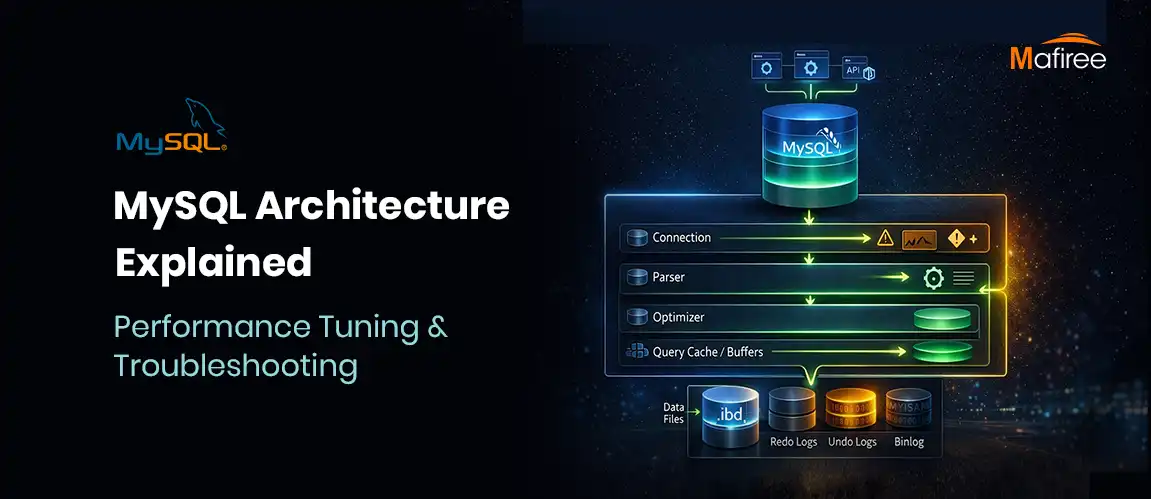
MySQL Architecture Explained: Performance Tuning & Troubleshooting Guide

MySQL features a unique tiered architecture that separates query processing from data storage through its pluggable storage engine model. This guide explores the core components—from connection handling and the SQL optimizer to the physical storage of data on disk. By understanding how engines like InnoDB provide ACID compliance and row-level locking, you can significantly improve your database's scalability. We also break down the query execution workflow and provide actionable tips for performance tuning, such as optimizing the buffer pool. Whether you're managing a replica set or a standalone instance, mastering MySQL’s internal structure is essential for building high-performance applications.

  2506 views
MariaDB vs MySQL: What's Different in 2026 and Which One Should You Use

Discover how MariaDB 11.x is redefining open-source databases with cutting-edge features like system-versioned tables, native AI-ready vector support, UUIDv7 for scalable inserts, and enterprise-grade security; all in the Community Edition, without the paywall.

  2040 views
MySQL’s Connection Control Plugin for Brute-Force Protection: A DBA Security Guide

“Fortify Your MySQL Security: Slow Down Attackers with Connection Control Plugin” Learn how the MySQL Connection Control Plugin helps defend against brute-force login attempts by introducing intelligent, progressive delays—without locking out legitimate users.

  13469 views
MySQL 8.4 Migration: Key Changes for IT Leaders

Explore the 8 critical changes in MySQL 8.4 you need to know before migrating your production environment. From authentication updates to InnoDB defaults, this release brings significant operational implications for developers and DBAs.

  973 views
Check Constraints in MySQL

Master Database Integrity with Check Constraints: Improve Data Quality and System Performance

  13418 views
Guarding Your Account: 5 Essential Tips to Evade Common Password Mistakes.

How to Secure your mysql database with the mysql validate password component

  3780 views
Access Control & Account Management In MySQL 8

Discover how MySQL 8 enhances security through features like password expiry, password validation, account lock/unlock, privilege management, and dual passwords. Safeguard your valuable data and streamline access control in your MySQL environment.

  4115 views
Significance of using Invisible Primary key (GIPK) with MySQL 8.0

How Generated Invisible Primary Keys (GIPK) Can Boost Your Database Efficiency

  3944 views
Optimize Your Database: Exploring MySQL 8.0 JSON Functions

This blog highlights the some of the important JSON function in MySQL 8.0 with examples. Level up your SQL skills with MySQL 8.0's JSON functions.

  5357 views
Best practices on enabling Audit log on MySQL, MariaDB and ProxySQL

Importance of audit log in MySQL, MariaDB and ProxySQL. Best practices to enable audit log

  5452 views
High Availability for MySQL using Orchestrator and ProxySQL

Auto slave promotion without any DBAs intervention using Orchestrator and ProxySQL. If you are looking for a HA solution without going for synchronous replication or Aws RDS then Orchestrator with ProxySQL is a great choice.

  3994 views
Understanding the Spider Storage Engine

MariaDB Spider is a storage engine that supports federation and sharding across multiple MySQL or MariaDB servers. It helps distribute data and workloads, making it useful for scaling large datasets, balancing traffic, and improving data retrieval through parallel processing.

  1998 views
Avoid deadlocks, certification failures on Galera Cluster using ProxySQL

Dealing with deadlocks, certification failures on Galera cluster by running single node writer using ProxySQL

  7395 views
MySQL Character Set: UTF8MB4 vs UTF8 and How to Choose the Right Encoding

Choosing the right MySQL character set is critical for ensuring accurate data storage, multilingual support, and proper text comparison. While the legacy utf8 (utf8mb3) character set supports only up to 3-byte characters, it fails to handle modern Unicode requirements such as emojis and certain international symbols. In contrast, utf8mb4 provides full 4-byte Unicode support, making it the recommended standard for modern applications. This guide explains the differences between UTF8MB4 and UTF8, their impact on storage and performance, and provides step-by-step instructions to configure and migrate your MySQL databases safely.

  6183 views
Real time data streaming from MariaDB to Columnstore

How real time data from transactional database(mariadb) to analytic database(columnstore) is achieved using MariaDB's maxscale binlog streaming

  1698 views
Fixing the MariaDB Galera Bug: WSREP Lock Waits

A MariaDB Galera cluster can experience severe stalls when concurrent updates to the same primary key trigger an unexpected deadlock issue. This blog explains how we reproduced the issue in MariaDB 10.2, why the affected node became unresponsive, and the recovery and upgrade options used to resolve it.

  4862 views

Subscribe for email updates

RSS feed
Get in touch with us

Highlights

More than 6000 Servers Monitored

Happy Clients

Certified DBAs

24 x 7 x 365 Support

PCI

Database Services

MySQL MongoDB PostgreSQL SQL Server Aerospike Clickhouse TiDB ScyllaDB

Quick Links

Careers Blog Contact Privacy Policy Disclaimer Policy

Contacts

Linkedin Mafiree Facebook Mafiree Twitter Mafiree

Nagercoil Office

Miru IT Park, Vallankumaranvillai,

Nagercoil, Tamilnadu - 629 002.

Bangalore Office

Unit 303, Vanguard Rise,

5th Main, Konena Agrahara,

Old Airport Road, Bangalore - 560 017.

Call: +91 6383016411

Email: sales@mafiree.com


Copyright © - All Rights Reserved - Mafiree