
 Orbit
Orbit
 Xstreami

- About
- Services
- Blogs
- Careers
- Products
- Contact Schedule a Call
Huge data blocks resides under single MDF file might cause a performance of the query and impact the application services. This blog help you to understand how we can the split the single MDF file into multiple data files.
Murali September 10, 2026

Most of us do not think about using multiple files for the single database until data grows larger. Query performance starts to perform poorly on the PROD environment because the data blocks reside on a single MDF file. Let’s discuss what are all the techniques in SQL server to improve the performance by creating multiple data files and evenly distribute the data from old data files in this blog. There are two ways to achieve this,
Step 1: Add required new empty data files to the file group.
Step 2: Disable the autogrowth on new files.
Step 3: Need to empty an existing single data file (original).
Step 4: Re-enable autogrowth.
Step 5: Shrink the original datafile to the same size of the new files.
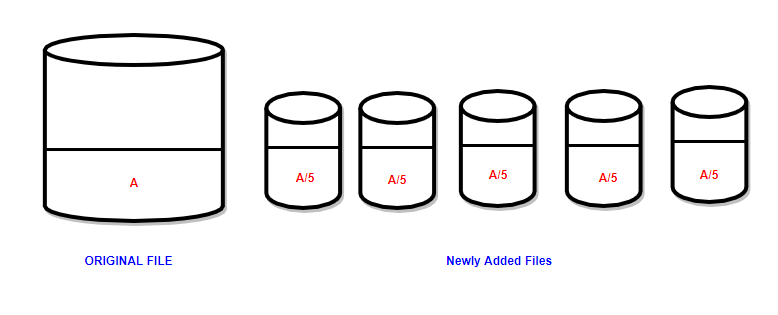
The reason we disabled autogrowth on the five new files is to prevent the original file from getting too empty. In order to balance all the data files we need to disable autogrowth on the newly created files.
Process behind shrink command with empty option:-
Note: Number of additional files is calculating depending on what level we shrink the existing data file.
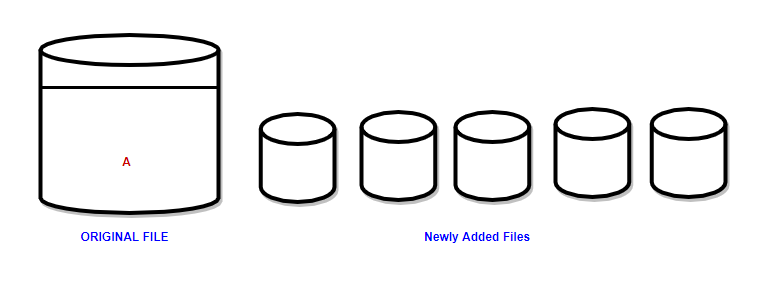
Originality of data files before the activity:-
-> A represents the Size of the data files
Originality of data files post the activity:-
-> A represents the Size of the data files
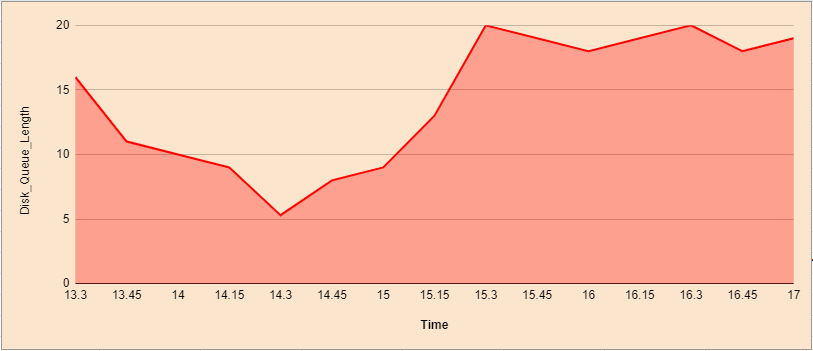
Performance during the activity:-
Disk Queue Length:-
Log Growth:-
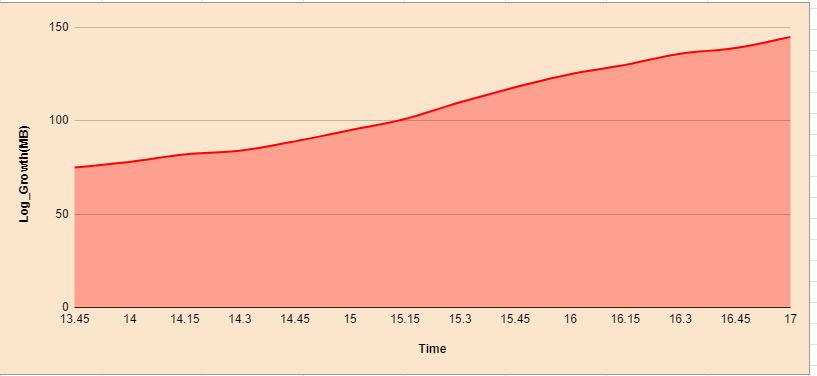
During this operation we will be facing a high IO and unexpected heavy log growth.So overcome this log growth,we need to change the recovery model FULL to BULK-LOGGED where the servers in standalone setup.With this change,we can avoid the drastical log growth and we can’t change the recovery model where the servers in a high availability mode.
Benefits:-
This process is done online and it does not affect the live object.
Limitations:-
Normally,data is stored in the leaf node of the clustered index.The File Group Method is nothing but the objects are moved to the new file group by rebuilding the clustered index on the new FG.
Existence of clustered index:-
Non-Existence of clustered index:-
Benefits:-
Limitations:-
Standalone env:-
If we change the recovery model from FULL to BULK-LOGGED,it will reduce the log growth,but we will lose the point-in-time recovery incase of any crashes/failures during the activity.So you should take the hot backup full/diff depending upon your needs without any delay.
HA env:-
Increases of log growth will affect the secondary setup because it’s working concept depends upon the Transaction Log.We are not able to change the recovery model from FULL to BULK-LOGGED because it will work only on FULL recovery model.
We will use adding a filegroup approach for both HA and standalone environments,it might cause log growth depending on recreation of index for the tables which are in larger size and for gaining the performance the new FG should be in separate physical drives.
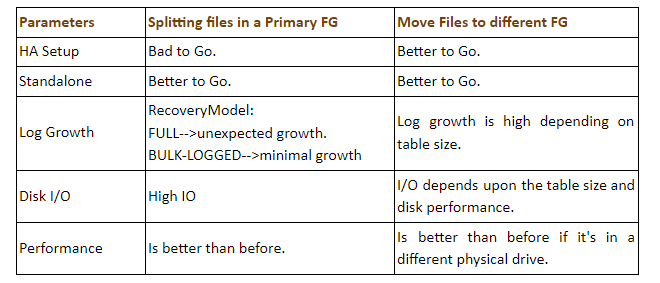
Splitting data files in a primary filegroup is a time taking online process with an expense of log growth depending on your database sizes and the addition of new FG method is not bit risky task when compared to the first method.So as we conclude,If we are in a standalone environment,we will go for the splitting method and in a high availability environment,we should go for adding filegroup methods to reduce the impact on the PROD environment.
At Mafiree, we help businesses optimize SQL Server storage, performance, and database architecture while choosing the right approach for their production and high-availability environments.
More than 6000 Servers Monitored
Happy Clients
Certified DBAs
24 x 7 x 365 Support



Miru IT Park, Vallankumaranvillai,
Nagercoil, Tamilnadu - 629 002.
Unit 303, Vanguard Rise,
5th Main, Konena Agrahara,
Old Airport Road, Bangalore - 560 017.
Call: +91 6383016411
Email: sales@mafiree.com